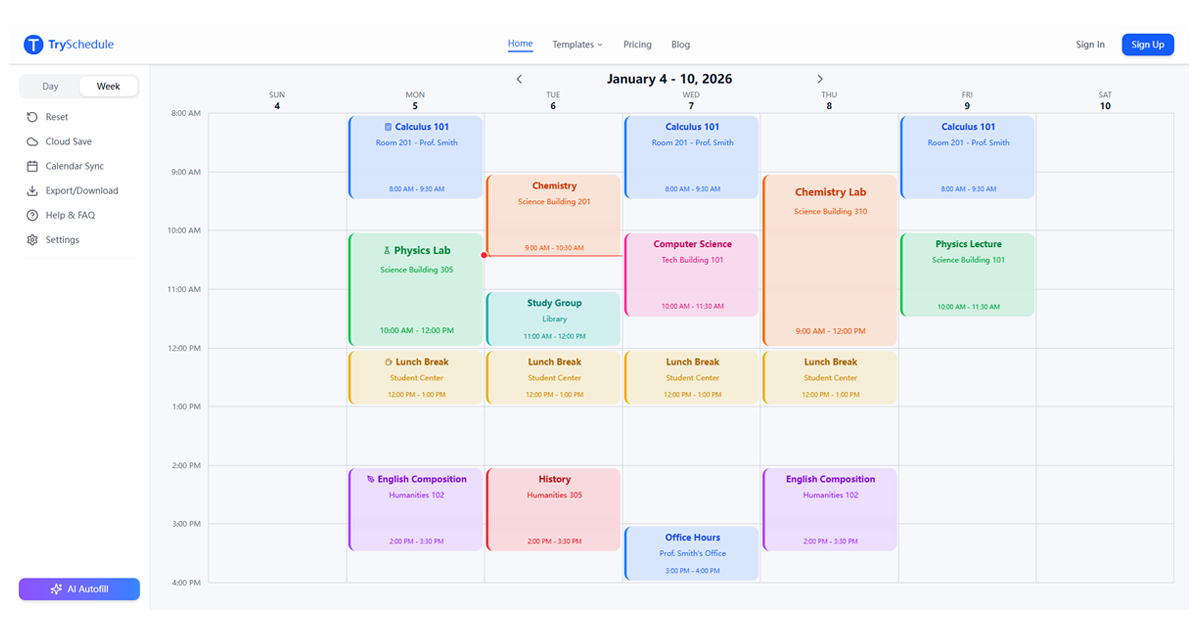
TrySchedule is a free online schedule builder designed to help users create professional weekly schedules in minutes. It offers a highly intuitive drag-and-drop interface, making planning effortless for various aspects of life.
This versatile SaaS targets a broad audience including students planning class timetables, shift managers organizing employee rotations, fitness enthusiasts structuring workout routines, and freelancers managing multiple client projects.
Key Features
- Zero Friction: No signup or login required to start building schedules immediately.
- Visual Drag-and-Drop Editor: Easily create and adjust time blocks with a user-friendly interface.
- Free Export Options: Download schedules as high-quality PNG or JPG images for free.
- Color-Coded Organization: Use colors and labels to categorize activities and visualize your week at a glance.
- Flexible Layouts: Adapts to work, school, fitness, and personal planning needs.
- Cloud Save: Free users can save up to 10 templates to the cloud, with more available in Pro.
Use Cases
TrySchedule excels in scenarios where visual, flexible weekly planning is crucial. Students can effortlessly map out their class schedules, study sessions, and exam preparation, ensuring a balanced academic life. Shift managers benefit from its ability to quickly build clear employee rosters and team rotations, optimizing coverage and communication.
For individuals focused on personal growth, fitness enthusiasts can organize their weekly workouts and routines, while freelancers can manage project schedules across multiple clients, preventing overlaps and improving time management. The tool's adaptability means it can also be used for family chore charts, event planning, or any recurring weekly activity.
Compared to traditional methods, TrySchedule offers significant advantages. It surpasses Excel in ease of use with drag-and-drop functionality and automatic color coding, eliminating manual formatting. Unlike calendar apps that focus on fixed dates, TrySchedule is built for designing ideal recurring weekly routines. It also provides superior flexibility over paper planners, allowing instant changes without messy cross-outs, and offers a cost-effective alternative to expensive premium scheduling software.
Pricing Information
TrySchedule operates on a freemium model. The core features are 100% free, allowing users to create unlimited schedules, utilize all color options, export as PNG or JPG images, and save work locally without any account or payment. Free users also get cloud save for up to 10 templates. For power users, a Pro subscription unlocks advanced capabilities such as PDF export, AI-powered scheduling suggestions, and expanded cloud storage for up to 50 templates.
User Experience and Support
The platform boasts a highly visual and intuitive user interface, centered around a drag-and-drop calendar grid. This design ensures that users can quickly add, adjust, and organize time blocks with minimal effort, requiring no design skills. A step-by-step video tutorial is available on YouTube to guide users through the building and exporting process, enhancing the ease of adoption. The emphasis on "zero friction" means users can immediately start planning without any initial hurdles.
Technical Details
While specific programming languages or frameworks are not detailed, TrySchedule is presented as a web-based online schedule builder. Its functionality suggests a modern front-end application with client-side data storage (browser's local storage by default) and optional cloud integration for Pro features. The focus is on a seamless, responsive user experience accessible directly through a web browser.
Pros and Cons
- Pros:
- Completely free for core features with no signup required.
- Highly intuitive drag-and-drop visual editor.
- Free high-quality PNG/JPG export for sharing and printing.
- Flexible and adaptable for diverse scheduling needs (work, school, personal).
- Offers cloud save for templates (up to 10 for free users).
- Cons:
- Advanced features like PDF export and AI suggestions require a Pro subscription.
- Limited cloud storage for free users (10 templates).
- No explicit mention of direct customer support channels beyond tutorials.
Conclusion
TrySchedule stands out as an exceptionally fast, simple, and flexible online schedule builder, empowering users to visualize and manage their weekly commitments effectively. Its zero-friction approach and robust free features make it an ideal tool for anyone seeking to improve their time management and productivity. Explore TrySchedule today to streamline your weekly planning and bring clarity to your schedule.
Comments
Publisher

Launch Date2026-10-01
Platformweb
Pricingfreemium
Tech Stack
#web
Outbid
View🥇 🥈
🥈 🥉
🥉
Want this spot? Pay what you wantBoost Domain Rating - Boost Domain Rating is a platform to discover and upvote the best tech products. Find top products launching daily.
Boost Domain Rating is a platform to discover and upvote the best tech products. Find top products launching daily.
$35
DirEasy - The Best Directory Boilerplate with AI | DirEasy
The best directory boilerplate, packed with AI, Listings, Payment, Submission, CMS, Blog, Authentication, Newsletter, SEO and more.
$30
Quiz Shot - Solve Any Screenshot Question in Seconds.
AI Study Assistant that answers any screenshot question. Get free AI tutor and step-by-step math and homework help with ChatGPT.
$25